
- +1
【双语话个税】@Foreigners,个税APP如何注册、找回密码、绑定银行卡相关操作看这里!
个人所得税APP如何注册、找回密码、绑定银行卡?让我们一起来看看吧!
How to Register Individual Income Tax APP?
How to Find your Password in Individual Income Tax APP?
How to Link Bank Card in Individual Income Tax APP?
Let's check it out!
01
个人所得税APP用户注册流程
How to Register Individual Income Tax APP
a. 获取【注册码】:
(a)若本人办理,请携护照原件到任一办税服务厅获取【注册码】(有效期为7天);
(b)若委托办理,请受托人持委托书、护照复印件和受托人身份证办理。
a. Get a Registration Code
(a)Visit Tax Service Hall and get the Registration Code with your Passport personally, which is valid for 7 days;
(b)If entrust agency, please ask the agent to bring the Letter of Authorization, photocopy of passport's first page and trustee’s ID.
b.下载并安装【个人所得税】APP;
Download and install Individual Income Tax APP;
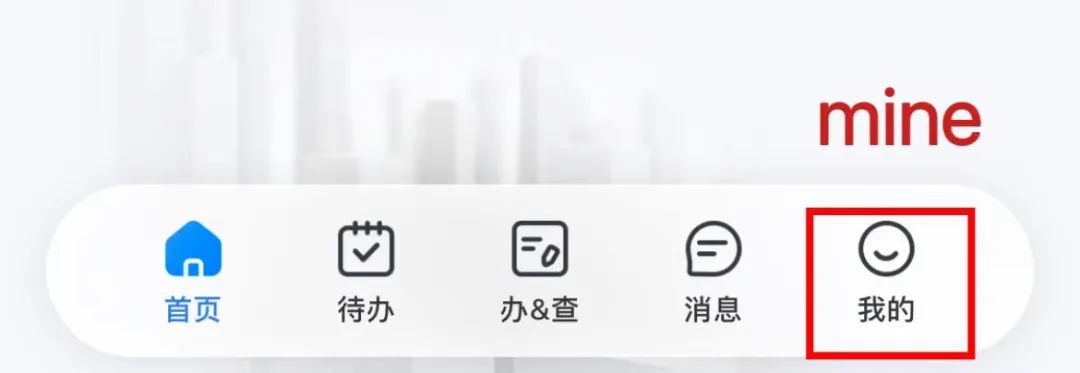
c.打开【个人所得税APP】,点击底部【我的】;
Open ITS APP and tap the icon "mine" at the bottom;
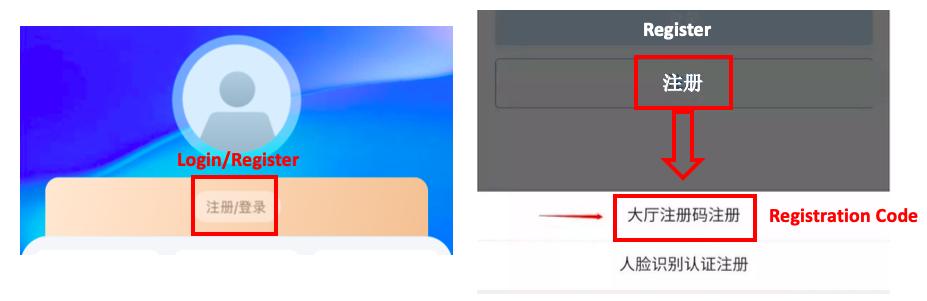
 d.点击顶部【登录/注册】再点【注册】选择【大厅注册码注册】;
Click the Login/Register at the top, then click Register and select Registration Code to register;
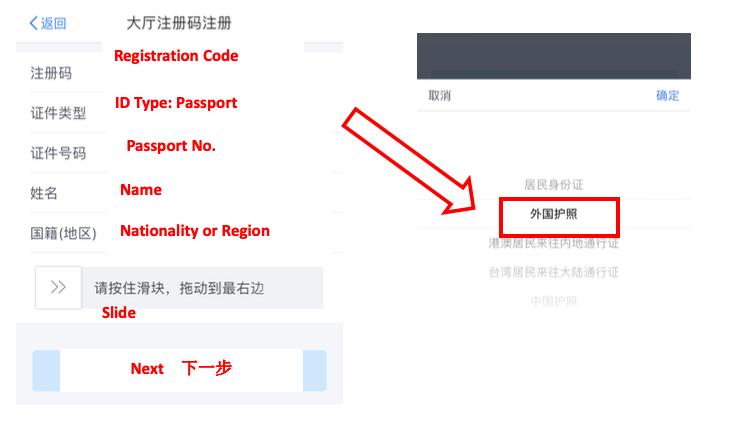
 e.点击【同意并继续】用户注册协议,进入注册界面;输入注册码、身份证号码、姓名,点击下一步;
Click Allow to agree with register contract, then enter the register page;Input the Registration Code, select the ID type: Passport, input Passport No., Name, select the Nationality, slide and click Next;
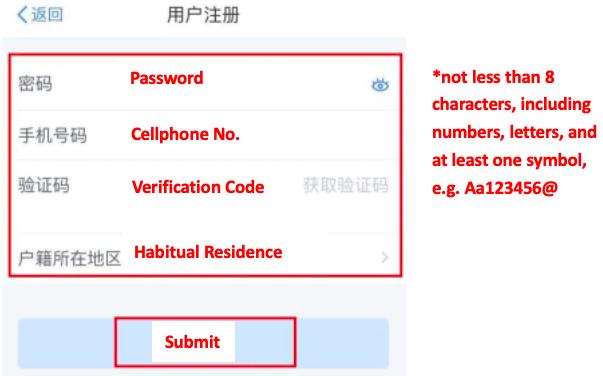
 f.录入密码、手机号并获取验证码、经常居住地,点击【提交】,完成注册;APP登录名为手机号码。
Input the Password, Cellphone No., get the Verification Code, select the Habitual Residence, then click Submit to complete the register. The APP login name is the Cellphone No.
 02
02个人所得税APP找回密码
How to Find your Password in Individual Income Tax APP
a.打开【个人所得税APP】,点击底部【我的】;
Open ITS APP and tap the icon "mine" at the bottom;
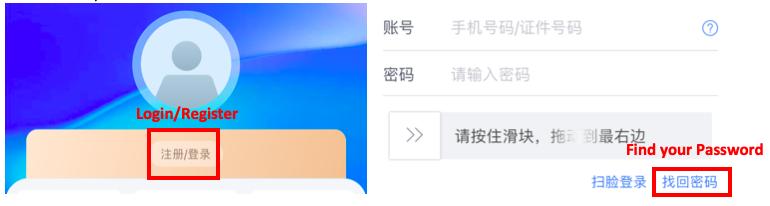
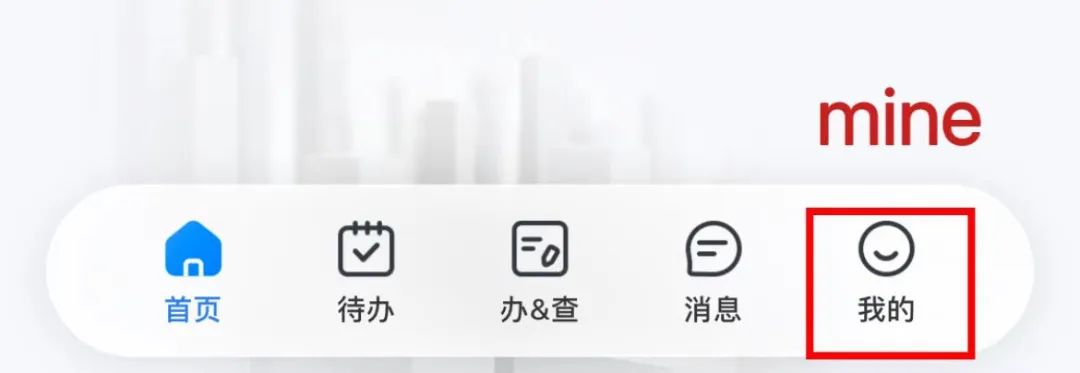 b.点击顶部【登录/注册】再选择【找回密码】;
Click the Login/Register at the top, then click Find your Password;
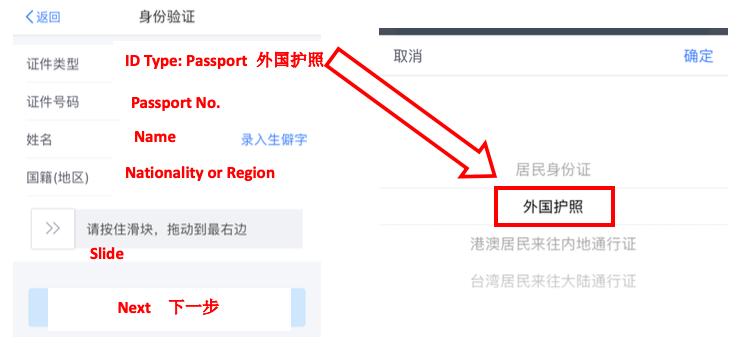
 c.选择证件类型外国护照,输入护照号码、姓名、国籍;
Select the ID type: Passport, input Passport No., Name, select the Nationality, slide and click Next;
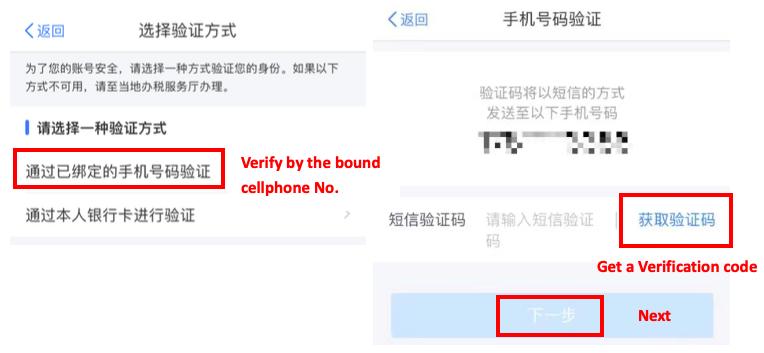
 d.选择验证方式,可以通过手机号码或银行卡验证;获取验证码,输入后点击下一步;
Choose verification method: one is Cellphone No., the other is bank account; input the verification code and click Next;
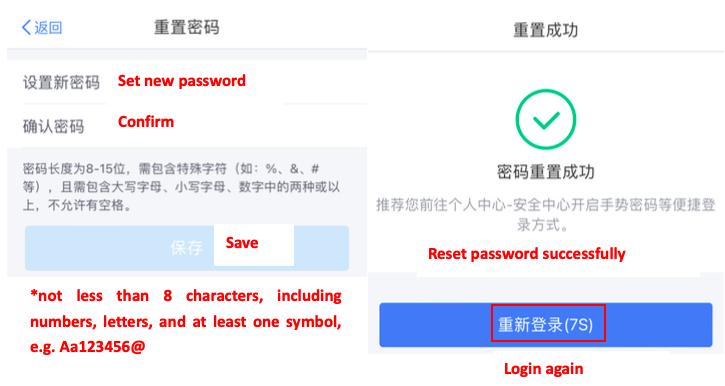
 e.重置密码,设置新密码,确认密码后保存。
Input new password, confirm and save to reset password.
 03
03个人所得税APP绑定银行卡
How to Link Bank Card in Individual Income Tax APP
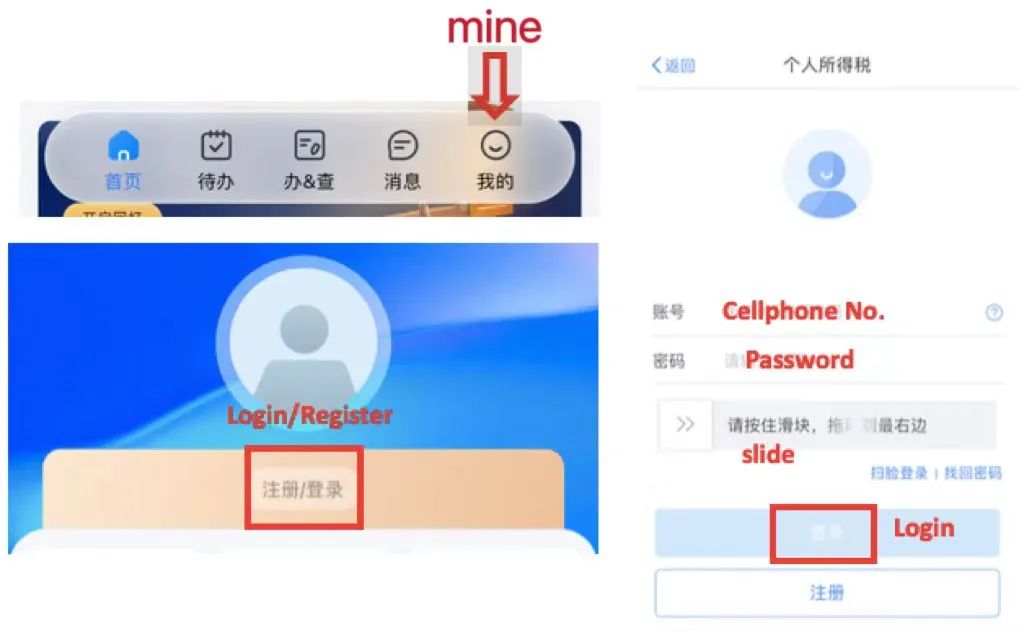
a.打开【个人所得税APP】,点击底部【我的】,选择【登录】,输入手机号和密码,滑动后点击【登录】;
Open ITS APP and tap the icon "mine" at the bottom; click Login, input cellphone No. and password, slide and click Login;
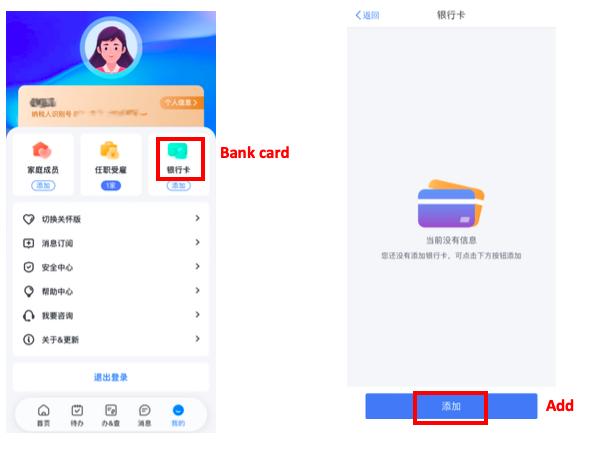
 b.点击【银行卡】再选择【添加】;
Click the Bank card, then click Add at the bottom;
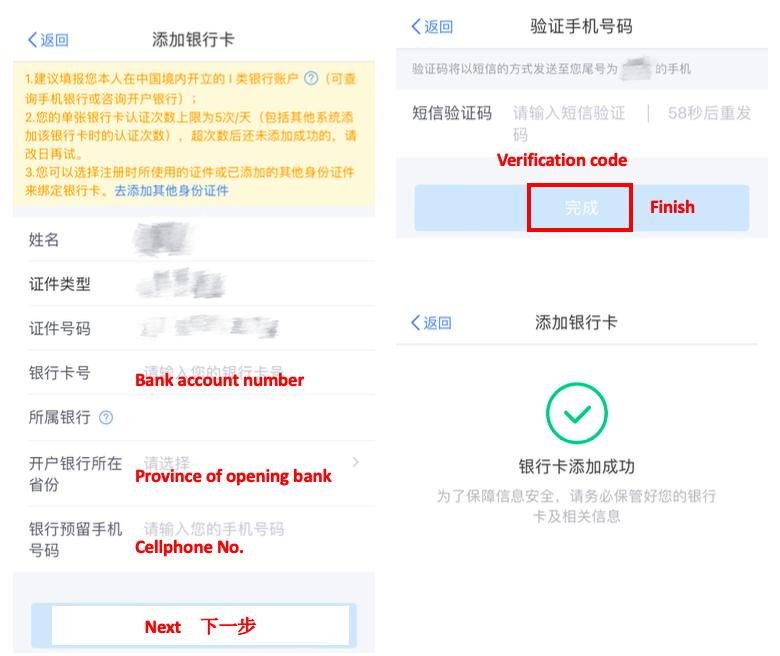
 c.输入银行卡号、开户银行所在省份、手机号,点击下一步;输入验证码,点击【完成】,银行卡添加成功。
Input bank account number, province of opening bank, cellphone No., and click Next; input the verification code and click Finish, then bank card is linked successfully.
 供稿:刘云平 胡梦婷
制作:胡梦婷
继续滑动看下一个轻触阅读原文
 上海税务向上滑动看下一个
原标题:《【双语话个税】@Foreigners,个税APP如何注册、找回密码、绑定银行卡相关操作看这里!》
本文为澎湃号作者或机构在澎湃新闻上传并发布,仅代表该作者或机构观点,不代表澎湃新闻的观点或立场,澎湃新闻仅提供信息发布平台。申请澎湃号请用电脑访问http://renzheng.thepaper.cn。






- 报料热线: 021-962866
- 报料邮箱: news@thepaper.cn
互联网新闻信息服务许可证:31120170006
增值电信业务经营许可证:沪B2-2017116
© 2014-2026 上海东方报业有限公司